The tracker that carries its own charger.
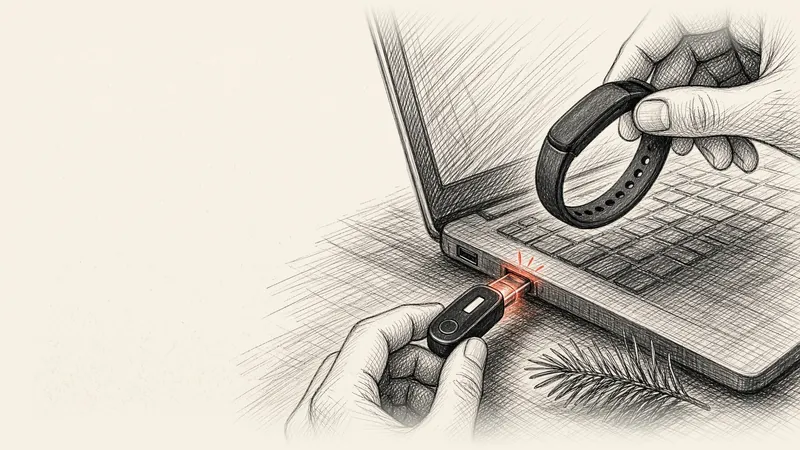
A fitness tracker with a built-in USB charger hides a USB plug under its strap. Slide the strap off one end, push the watch into any USB port on a laptop, wall adapter or car charger, and it charges directly, so the charger travels everywhere the tracker goes. MotionCred uses this design and runs up to 12 days on a full charge.
Key takeaways
- The plug lives inside the band, so the charger is always with you.
- Any USB port works: laptop, wall adapter, car charger or power bank.
- One charge lasts up to 12 days of typical use and about 30 days in standby.
- Hourly sync and a short list of alert apps stretch each charge.
How built-in USB charging works
- Slide the strap off. Hold the watch body and pull the strap away from one end. A USB plug sits where the strap was.
- Plug it into any USB port. The plug fits one way. If it resists, turn the watch over and try again.
- Slide the strap back on. Once the battery icon reads full, push the strap over the plug until it sits flush with the watch.
The plug is a standard USB-A connector, the rectangular kind found on wall adapters, car chargers, power banks and most laptops. Laptops with USB-C ports alone take a small USB-C to USB-A adapter.
Why a built-in plug beats a charging cable
Many trackers charge through a small proprietary cable or magnetic clip. Those cables are easy to leave behind in a dorm, a gym bag or a relative's guest room, and the tracker goes flat until a replacement arrives. A built-in plug solves that for good:
- Zero extra cables to pack, buy or lose.
- Every USB port becomes a charger, including the laptop already in the backpack.
- Holiday travel gets simpler, because the tracker shares the adapter you bring for your phone.
What 12 days of battery looks like
MotionCred runs on a 120 mAh lithium-ion battery rated for up to 12 days of typical use and about 30 days in standby. A charge on Christmas morning carries it through January 5. The watch screen and the Band tile in the MotionCred app both show the battery level, so a low charge is easy to spot.
Five habits that stretch each charge
- Choose hourly sync. Under Settings, Sync with eFit, the Every hour option uses less power than Live, which checks every 5 minutes.
- Pick alert apps with care. Each buzz uses a little battery, so send alerts from the apps that matter most.
- Set the move reminder to suit you. Turn it off on days you prefer to move on your own schedule.
- Top up before trips. A full charge before travel covers a long holiday away.
- Keep it cool. Store the tracker away from extreme heat, such as a car in summer.
Charge it safely
- Charge once the watch and plug are fully dry.
- Wipe the plug with a soft, dry cloth if charging stalls, then try another USB port or a wall adapter.
- Wear the strap fully seated over the plug, which keeps sweat and water away from the contacts.
- Recycle the watch with electronics at the end of its life; the battery is sealed inside.
Choosing your first tracker? Our budget activity tracker guide lists the seven features worth paying for.
Quick answers
Which fitness trackers charge with a built-in USB plug?
Several budget bands hide a USB plug under the strap. MotionCred ($49) is one of them: slide the strap off one end and push the watch into any USB port. It pairs with Android 9 and newer through the free MotionCred app and runs up to 12 days per charge.
How do you charge a fitness tracker with a USB plug in the band?
Hold the watch body and pull the strap off one end to uncover the plug. Push the plug into a USB port on a computer or wall adapter; it fits one way, so flip it over if it resists. Charge until the battery icon is full, then slide the strap back on until it sits flush.
Can I charge MotionCred with a phone charger?
Yes. Plug it into the USB port of a phone charger, laptop, car charger or power bank. Chargers and laptops with USB-C ports alone take a small USB-C to USB-A adapter.
How long does the MotionCred battery last?
Up to 12 days of typical use and about 30 days in standby from a 120 mAh battery. Live sync, phone alerts and long workouts use more power; hourly sync stretches each charge.
Is it safe to charge a fitness tracker after a workout?
Wipe off sweat and let the watch and its plug dry fully first. MotionCred is rated IP67 for sweat and rain, and a dry plug keeps charging safe and reliable.